
Fail2Ban 保护 SSH
Dive into our beginner’s guide on securing SSH with Fail2Ban to safeguard your server from unauthorized access and brute-force attacks.
深入研究我们的初学者指南,了解如何使用 Fail2Ban 保护 SSH,以保护您的服务器免受未经授权的访问和暴力攻击。
We will start with a metaphor. Imagine a fortress; while its tall walls and strong gates are built to keep out unwanted visitors, there will always be those who attempt to scale the walls or force the gates.
我们将从一个比喻开始。想象一座堡垒;虽然它的高墙和坚固的大门是为了阻止不受欢迎的访客而建造的,但总会有人试图攀登墙壁或强行打开大门。
Similarly, our digital fortress, especially servers, faces persistent threats. One such gate to it is the Secure Shell (SSH), a protocol allowing secure remote access. So, just as gates require guards and monitoring systems, SSH requires protective measures against potential intruders.
同样,我们的数字堡垒,尤其是服务器,面临着持续的威胁。其中一个这样的入口是安全外壳 (SSH),这是一种允许安全远程访问的协议。因此,正如大门需要警卫和监控系统一样,SSH 也需要针对潜在入侵者的保护措施。
Enter Fail2Ban – a vigilant sentry for your servers. It is one of the most effective shields against unauthorized access attempts, especially brute force.
输入 Fail2Ban——您服务器的警惕哨兵。它是防止未经授权的访问尝试(尤其是暴力破解)的最有效的防护措施之一。
What is Fail2Ban?
什么是 Fail2Ban?
Fail2Ban is an open-source software tool that protects against automated malicious activities like brute-force server attacks.
Fail2Ban 是一款开源软件工具,可防止暴力服务器攻击等自动化恶意活动。
One of its most valuable things is it acts proactive. In other words, instead of waiting for an attack, Fail2Ban offers an approach by identifying and blocking potential threats in real time.
它最有价值的事情之一就是它的主动行动。换句话说,Fail2Ban 提供了一种实时识别和阻止潜在威胁的方法,而不是等待攻击。
The beauty of Fail2Ban lies in its simplicity and adaptability. While it is frequently used to secure SSH, its functionality isn’t limited to this protocol. Fail2Ban can be configured to monitor any service’s log files, providing a versatile solution for services like FTP, SMTP, web servers, and more.
Fail2Ban 的美妙之处在于它的简单性和适应性。虽然它经常用于保护 SSH,但其功能并不限于此协议。 Fail2Ban 可以配置为监视任何服务的日志文件,为 FTP、SMTP、Web 服务器等服务提供多功能解决方案。
Moreover, it is light on resources, so it doesn’t burden your server’s performance – a critical consideration for servers handling high volumes of transactions or interactions.
此外,它占用的资源很少,因此不会对服务器的性能造成负担——这是处理大量事务或交互的服务器的一个关键考虑因素。
How Fail2Ban Works
Fail2Ban 的工作原理
First, let us briefly explain what exactly is brute-forcing. It is a type of cyberattack in which an attacker attempts to gain unauthorized access to a system or service by systematically trying all possible combinations of passwords or encryption keys until the correct one is found.
首先,我们简单解释一下什么是暴力破解。这是一种网络攻击,攻击者试图通过系统地尝试所有可能的密码或加密密钥组合直到找到正确的组合来获得对系统或服务的未经授权的访问。
In this regard, Fail2Ban monitors server logs for specific patterns indicative of such attacks – for example, repeated failed login attempts within a short time frame.
在这方面,Fail2Ban 会监视服务器日志中是否存在表明此类攻击的特定模式,例如,短时间内重复尝试失败的登录。
Based on predefined or custom rules, called “filters,” Fail2Ban identifies patterns that suggest an attack and automatically triggers some predefined action. The most common one is to temporarily ban the IP address of the attacker, enforce firewall rules, and prevent further malicious attempts.
根据称为“过滤器”的预定义或自定义规则,Fail2Ban 可以识别建议攻击的模式并自动触发某些预定义的操作。最常见的一种是暂时禁止攻击者的 IP 地址、强制执行防火墙规则并防止进一步的恶意尝试。
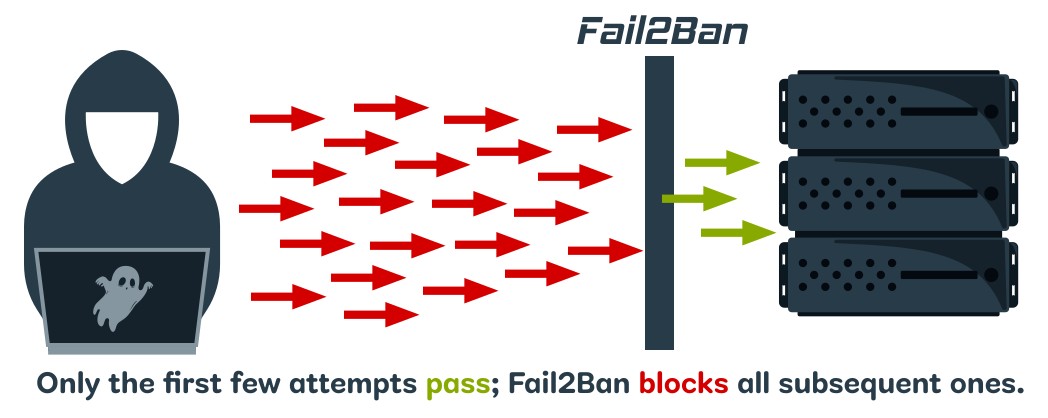
How Fail2Ban Works
A key feature of Fail2Ban is the concept of “jails” – specific monitoring policies for server services that combine a filter with actions. You can have different jails for different services (e.g., one for SSH, another for FTP, etc).
Fail2Ban 的一个关键功能是“监狱”的概念——将过滤器与操作相结合的服务器服务的特定监控策略。您可以为不同的服务设置不同的监狱(例如,一个用于 SSH,另一个用于 FTP 等)。
Each jail specifies which log file to monitor, what patterns to look for, and what actions to take when those patterns are detected.
每个监狱指定要监视的日志文件、要查找的模式以及检测到这些模式时要采取的操作。
After being banned for a set period, the IP address is automatically unbanned, allowing legitimate users who might have been temporarily blocked due to, for instance, forgetting their password to try again.
被封禁一段时间后,该 IP 地址会自动解封,允许因忘记密码等原因而被暂时封禁的合法用户重试。
Installing Fail2Ban
安装 Fail2Ban
Let’s now install Fail2Ban, which is quite simple, as you can see. Please use the command appropriate for the Linux distribution you are using.
现在让我们安装 Fail2Ban,如您所见,这非常简单。请使用适合您所使用的 Linux 发行版的命令。
Debian / Ubuntu
sudo apt install fail2banNo further action is needed here since the service is automatically activated after installation.
这里不需要采取进一步的操作,因为该服务在安装后会自动激活。
RHEL / Rocky Linux / Alma Linux / Fedora
RHEL / Rocky Linux / Alma Linux / Fedora
Since Fail2Ban resides in the EPEL repository, you must first add it to your system if you have not already done so:
由于 Fail2Ban 驻留在 EPEL 存储库中,因此您必须首先将其添加到您的系统(如果尚未这样做):
sudo dnf install epel-releaseThen install Fail2Ban and enable the service to start on boot:
然后安装 Fail2Ban 并启用该服务在启动时启动:
sudo dnf install fail2ban
sudo systemctl enable fail2ban
openSUSE
开放SUSE
sudo zypper in fail2banConfiguring Fail2Ban for SSH
为 SSH 配置 Fail2Ban
Once installed, the main configuration file is “/etc/fail2ban/jail.conf.” However, best practices do not recommend modifying this directly. Instead, we will copy it by creating a new one with the extension “.local.” Why? It is simple – this avoids merging problems when upgrading. So, let’s do it.
安装后,主要配置文件是“/etc/fail2ban/jail.conf”。但是,最佳实践不建议直接修改它。相反,我们将通过创建一个扩展名为“.local”的新文件来复制它。为什么?这很简单——这可以避免升级时的合并问题。那么,让我们开始吧。
sudo cp /etc/fail2ban/jail.conf /etc/fail2ban/jail.localWhen the Fail2Ban service is restarted, the “jail.conf” file is read first, then “jail.local,” with later settings overriding earlier ones.
重新启动 Fail2Ban 服务时,首先读取“jail.conf”文件,然后读取“jail.local”,后面的设置会覆盖之前的设置。
Now, let’s get to the fun part – configuring Fail2Ban. Open the “jail.local” file with your preferred terminal text editor.
现在,让我们开始有趣的部分——配置 Fail2Ban。使用您喜欢的终端文本编辑器打开“jail.local”文件。
sudo nano /etc/fail2ban/jail.localScroll down until you find the “[sshd]” part, which looks similar to the one below.
向下滚动直到找到“[sshd]”部分,它看起来与下面的类似。
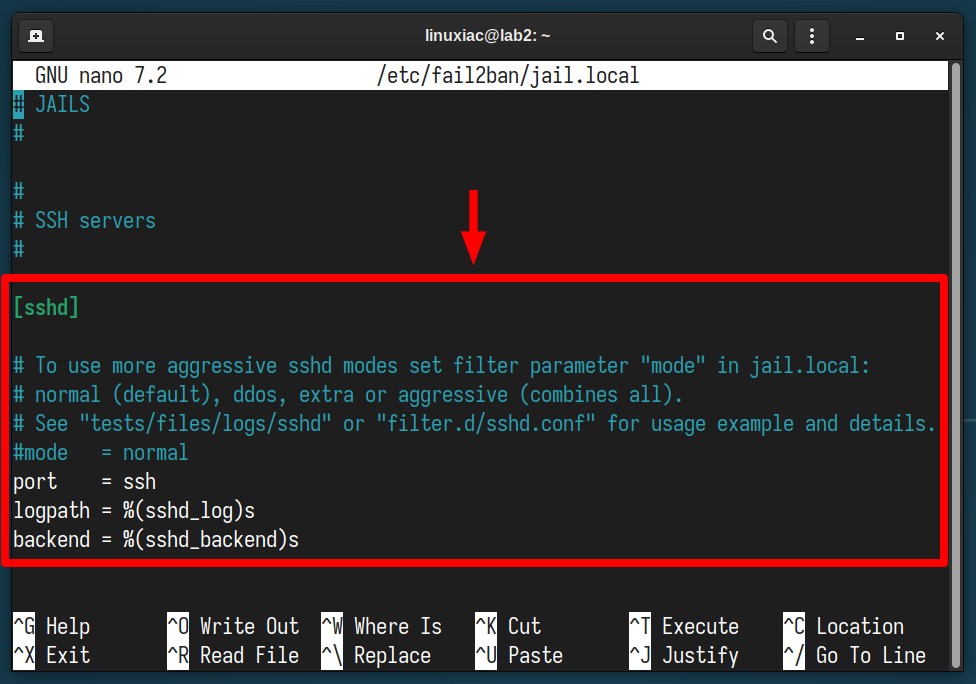
Edit the ‘jail.local’ file.
Replace the existing contents of the “[sshd]” part with this:
将“[sshd]”部分的现有内容替换为:
[sshd]

enabled = true
port    = ssh
backend = systemd
maxretry = 3
findtime = 300
bantime = 3600
ignoreip = 127.0.0.1
The final version should look like the one shown below. Need to know what these options mean? Fear not – we’ve explained each one in detail further down.
最终版本应如下所示。需要知道这些选项的含义吗?不要害怕——我们已经在下面进一步详细解释了每一项。
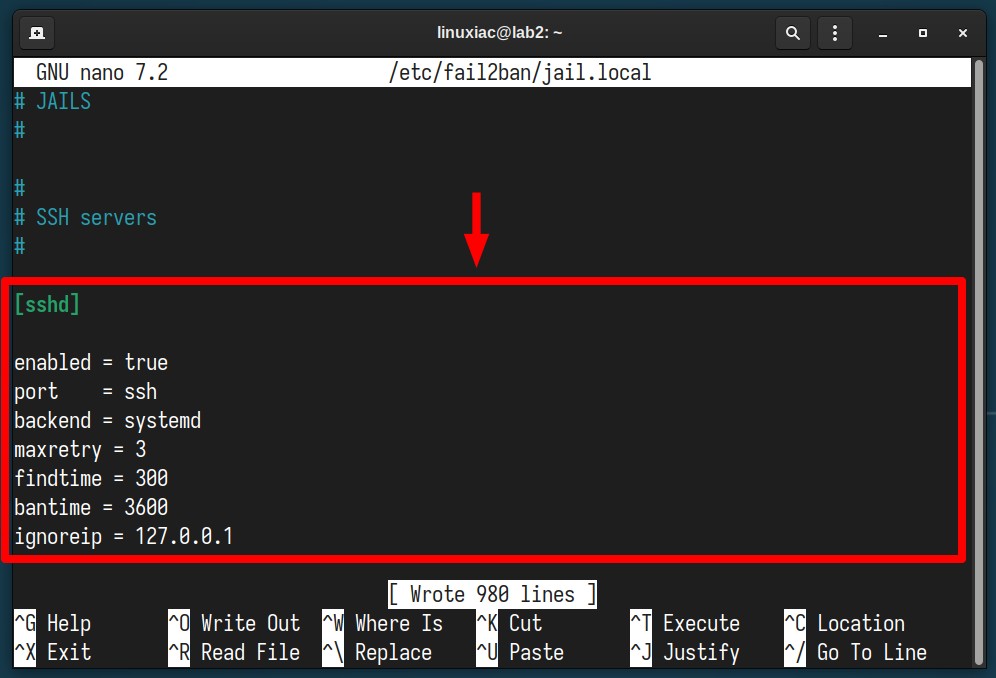
Configuring Fail2Ban
enabled – Determines if the jail is active or not.
启用 – 确定监狱是否处于活动状态。port – Specifies the port(s) you want to monitor. Accepts any port number or service name, e.g., “ssh,” “22,” “2200,” etc.
port – 指定您要监控的端口。接受任何端口号或服务名称,例如“ssh”、“22”、“2200”等。backend – Specifies the backend used to get file modification. Since all modern Linux systems rely on systemd’s logging service, we specify it as our backend.
backend – 指定用于获取文件修改的后端。由于所有现代 Linux 系统都依赖于 systemd 的日志服务,因此我们将其指定为后端。maxretry – The number of failed attempts from an IP before it is banned.
maxretry – 某个 IP 在被禁止之前尝试失败的次数。findtime – The timeframe (in seconds) during which “maxretry” failed logins will lead to a ban. We have specified 300 seconds, i.e., 5 minutes.
findtime – “maxretry”失败登录将导致禁止的时间范围(以秒为单位)。我们指定了 300 秒,即 5 分钟。bantime – The duration (in seconds) an IP should stay banned. In our case, we have set 3600 seconds, which means that in the next hour, any subsequent requests (not just to the SSH port) from this IP address will be blocked.
bantime – IP 应保持禁止状态的持续时间(以秒为单位)。在我们的例子中,我们设置了 3600 秒,这意味着在接下来的一小时内,来自该 IP 地址的任何后续请求(不仅仅是到 SSH 端口)都将被阻止。ignoreip – Allows you to whitelist IP addresses that should be ignored. This ensures that given IP addresses, even if they exceed the number of failed attempts specified in “maxretry,” will not be blocked.
ignoreip – 允许您将应忽略的 IP 地址列入白名单。这可确保给定的 IP 地址,即使超过“maxretry”中指定的失败尝试次数,也不会被阻止。
That’s it. Save the file and exit, then restart the Fail2Ban service.
就是这样。保存文件并退出,然后重新启动 Fail2Ban 服务。
sudo systemctl restart fail2banThen, make sure everything is OK with the service.
然后,确保服务一切正常。
sudo systemctl status fail2ban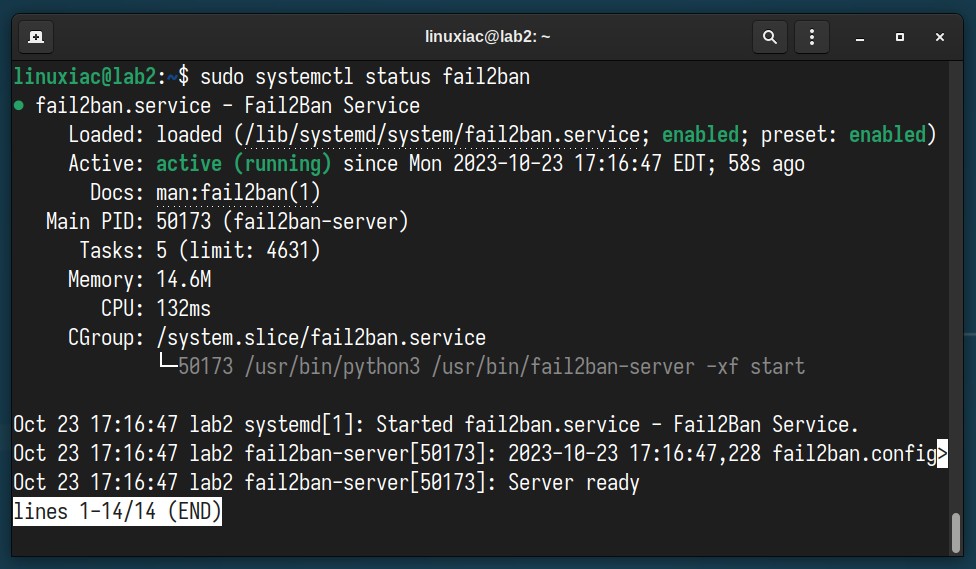
Check if the service is up and running.
Testing & Monitoring
测试与监控
Try logging in via SSH several times from another computer to the server on which you just installed and configured Fail2Ban. After the third failed attempt, your access should be blocked.
尝试通过 SSH 从另一台计算机多次登录到刚刚安装和配置 Fail2Ban 的服务器。第三次尝试失败后,您的访问应该被阻止。
You’re already probably wondering how to monitor what’s happening inside. The good news is that Fail2Ban has excellent integrated tools for this purpose. To see IP addresses that are currently blocked, run the following command:
您可能已经想知道如何监控内部发生的情况。好消息是 Fail2Ban 拥有用于此目的的优秀集成工具。要查看当前被阻止的 IP 地址,请运行以下命令:
sudo fail2ban-client status sshd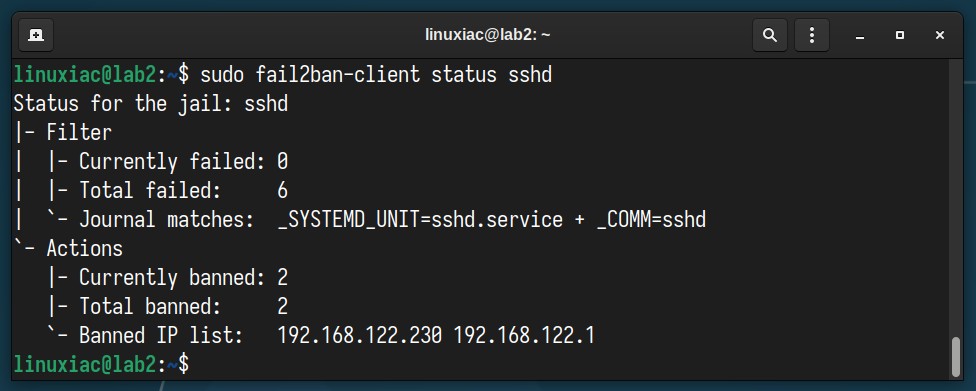
Check the IP addresses blocked by Fail2Ban.
If we go even further and review the iptables rules, we will find that Fail2Ban has created a chain (“f2b-sshd “) in which it has inserted the IP addresses in question. They will be automatically removed from there after the timeout period given in the “bantime” option.
如果我们进一步查看 iptables 规则,我们会发现 Fail2Ban 创建了一条链(“f2b-sshd”),其中插入了相关 IP 地址。在“bantime”选项中指定的超时期限过后,它们将自动从那里删除。
sudo iptables -L -n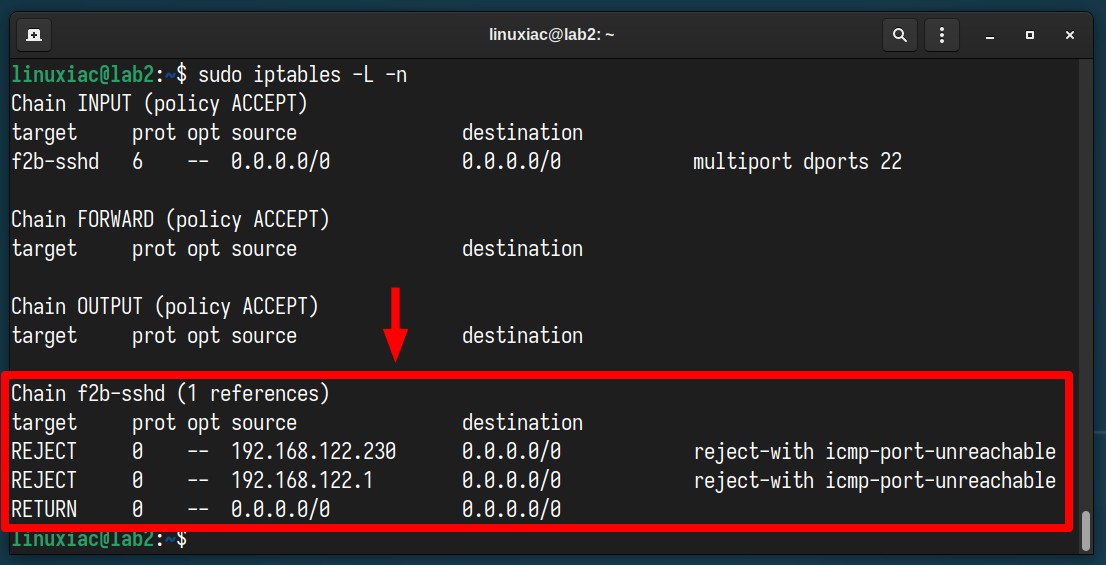
List iptables rules.
To manually unbans all IP addresses in all jails, execute the following:
要手动取消禁止所有监狱中的所有 IP 地址,请执行以下命令:
sudo fail2ban-client unban --allFor a separate address only, your command should be:
仅对于单独的地址,您的命令应该是:
sudo fail2ban-client unban <ip-address>Of course, the fail2ban-client command has many other options, giving you great possibilities and flexibility. If you are curious to see them in detail, look here.
当然,fail2ban-client 命令还有许多其他选项,为您提供了巨大的可能性和灵活性。如果您想详细了解它们,请查看此处。
Important to Keep In Mind
重要的是要记住
Although Fail2Ban is excellent software, it is not as beneficial when your SSH server is configured to only public key authentication, as it is impossible to log in with a password. More about that here.
尽管 Fail2Ban 是一款优秀的软件,但当您的 SSH 服务器配置为仅公钥身份验证时,它的用处就不大了,因为无法使用密码登录。更多相关信息请参见这里。
Additionally, remember that it does not replace the security a VPN would give you to access your server. Thus, unless absolutely required, avoid exposing your services to the internet.
此外,请记住,它不会取代 VPN 为您提供的访问服务器的安全性。因此,除非绝对必要,否则请避免将您的服务暴露在互联网上。
Conclusion
结论
Securing your server should always be a top priority. With SSH being a common entry point for many attackers, it requires particular attention.
保护服务器的安全始终应该是重中之重。由于 SSH 是许多攻击者的常见入口点,因此需要特别注意。
Through this guide, we’ve walked through the straightforward steps of installing and configuring Fail2Ban to monitor and protect SSH from repeated malicious login attempts.
通过本指南,我们逐步完成了安装和配置 Fail2Ban 的简单步骤,以监控和保护 SSH 免受重复的恶意登录尝试。
By setting up this tool, you’re adding an essential layer of security that can prevent potential intrusions. So, stay safe, stay updated, and always be proactive in your server’s defense strategy.
通过设置此工具,您可以添加一个重要的安全层来防止潜在的入侵。因此,保持安全,保持更新,并始终积极主动地制定服务器的防御策略。
Thanks for your time! Finally, we recommend you check the Fail2Ban GitHub page for additional help or valuable information.
谢谢你的时间!最后,我们建议您查看 Fail2Ban GitHub 页面以获取更多帮助或有价值的信息。

